Insight
Maximize Reimbursement: Your Guide to Charge Capture Automation in Epic
What Is Charge Capture?
Charge capture is the process of recording and translating clinical services, procedures, and medical supplies into billable charges for reimbursement. It ensures that healthcare organizations accurately reflect the care provided to patients—and are appropriately compensated for it.
In Epic and other EHR systems, charge capture can be manual (entered by clinicians or coders) or automated through tools like charge linking, flowsheet logic, and procedure-note triggers. Effective charge capture is essential for maintaining financial health, reducing revenue leakage, and supporting compliance.
Why Automate Charge Capture?
Charge capture automation—often referred to simply as charge automation—streamlines the process of converting clinical activity into billable charges by triggering them automatically based on documentation or ordering behavior.
By automating charge capture workflows, healthcare organizations can reclaim lost revenue, reduce compliance risk, and ease documentation burdens.
Tegria helped a Minnesota health system optimize charge capture, automation, reconciliation, and charge description master (CDM) governance to generate a net revenue gain of $19.4 million.
Automating Charge Capture Helps:
- Reduce missing charges
- Improve your time to charge
- You send claims more quickly
- Ensure documentation and charges match 1:1
- Maximize time for patient care
- Increase clinician satisfaction and efficiency
- Decrease denials for late charges
- Reduce underpayments
- Decrease late charge percentage
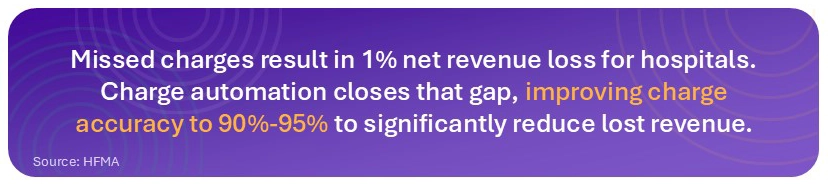
According to HFMA, hospitals lose up to 1% of net patient revenue due to missed charges, amounting to millions. By shifting from manual methods offering 65%-75% accuracy to documentation-based charge automation, which yields 90%-95% accuracy, organizations can recover significant lost revenue.
Charging in a clinical setting happens in one of three ways:
- Automatically through documentation and orders
- Via the charge capture preference list
- Via your friends in coding and revenue integrity
Dropping charges correctly the first time avoids time wasted tracking down lost revenue and improves the accuracy of department budgets. While tackling charge automation may seem like a lofty goal, these topics can provide focal points for your discussions with IT.
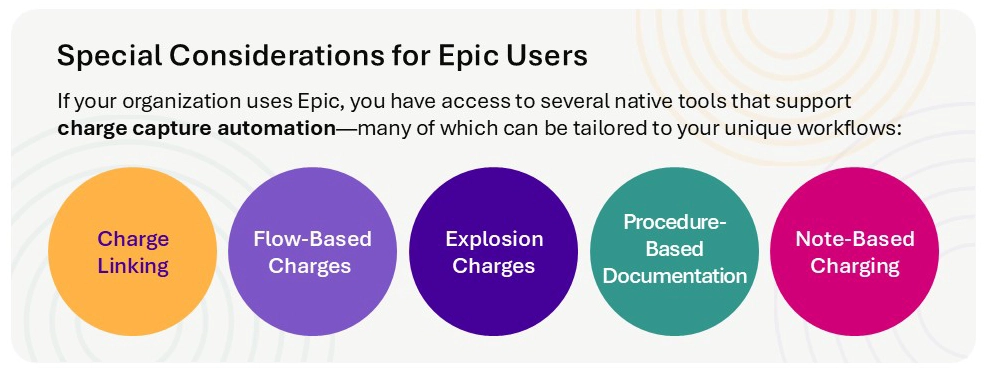
Key Focal Areas for Charge Automation
Where should healthcare organizations start? To achieve meaningful results, focus on specific areas where automation can drive the most impact. The methods below represent the most effective and widely used approaches to streamline charge capture, improve accuracy, and reduce manual effort.
- Charge and Order Linking
- Flowsheet-Based Charges
- Explosion Charges
- Procedure-Based Documentation
- Note-Based Charging
What Is Charge and Order Linking?
Charge linking, otherwise known as Orderable/Procedure/Chargeable (OPC) linking, is the most basic form of charge automation. It allows a linked charge to drop automatically after you place and complete an order.
What Are the Best Use Cases?
It’s most valuable for orders and charges that are always bundled together for certain procedures, such as point of care lab or imaging orders. Automatically dropping the charge after resulting or completion of the exam ensures accurate and timely charge information.
Using charge linking for Bed Charge billing can also drop your timed or daily bed charges for inpatient units, ranging from med surg to ICU or post-op surgical recovery areas. While you likely have this built out today for existing units, it is important to review the build and ensure correct documentation for additional ICU and med surg beds to meet patient surge needs.
Medication charges can also be set up to drop automatically upon administration to help ensure that charges are dropped only after medications are administered and the correct patient information is documented.
What Are Flowsheet-Based Charges?
When a clinician completes documentation in a doc flowsheet row, a charge can be dropped automatically in the background or one can be recommended based on overall flowsheet charging at the point of charge capture. If clinicians document their flowsheets in a timely manner, you can ensure that charges are filed at the same time without the need for an additional step. This can reduce missed charges and the time needed for reconciliation.
What Are the Best Use Cases?
Devices, including ventilators, can charge based on documenting in the doc flowsheet. Respiratory therapy charges can also be dropped as timed or one-time charges via flowsheet documentation as a standard part of their workflow. You can use this build to suggest additional charges to drop manually in the charge capture navigator.
What Are Explosion Charges?
Explosion charges automatically drop multiple charges after the initial one is dropped. Providers can frequently forget to file multiple charges associated with a procedure, but explosion charges can be set up so it drops all related charges when they file the charge for the procedure. This can reduce missed charges and the time needed for reconciliation.
What Are the Best Use Cases?
You can use this type of charge in a hospital’s outpatient surgical department by choosing one charge for a certain procedure and setting up the build to drop related supply, professional, and facility charges to minimize missing charges and save clinician time for charge entry.
What Is Procedure-Based Documentation (Proc Doc)?
Proc Doc is used to drop charges for a procedure as clinicians are writing and filing their notes using SmartForms. Some build is required from IT to allow these charges to drop automatically, but it can be used for any Epic Foundation Released procedure note templates.
What Are the Best Use Cases?
These types of charges are most often used for emergency departments, outpatient specialties (e.g., wound), and inpatient departments. Although Proc Doc may not be appropriate for every procedure, it can save clinicians valuable time, keep documentation together, and reduce missing charges.
What Is Note-Based Charging?
When providers file certain note types, a charge capture box pop-up appears and reminds clinicians to drop charges after filing their initial professional note for a patient. Though simple, note-based charging can be very effective at reminding providers to drop charges.
What Are the Best Use Cases?
When seeing patients during rounding, providers write and file their initial progress notes and are prompted with a pop-up to remind them to drop their charge. This saves clinicians extra clicks and headaches when dealing with queries and missed charges.
Conclusion
When implementing charge automation, it is important to make the system work for you, not the other way around. Review best practice system build recommendations for charge capture per charge type to ensure the system is automatically capturing charges, eliminating end-user intervention where possible, and giving your caregivers peace of mind.